Keep Salesforce current from Snowflake, in minutes and for pennies
A lightweight pattern for pushing only changed Snowflake data into Salesforce throughout the day, using dynamic tables, a stream, and lht.
So you’ve got a lot of data in Snowflake, and you need it in Salesforce. Not once, but throughout the day, so your users always see current information.
There are plenty of ways to do this. Few are good, and none are cheap. What you want is an approach that is:
- Lightweight: it runs in minutes, or even seconds.
- Inexpensive: no new platform to license or staff.
- Reliable and observable: it runs the same way every time, and you can see what it did.
The old adage says “fast, cheap, good: pick two.” This pattern gives you all three.
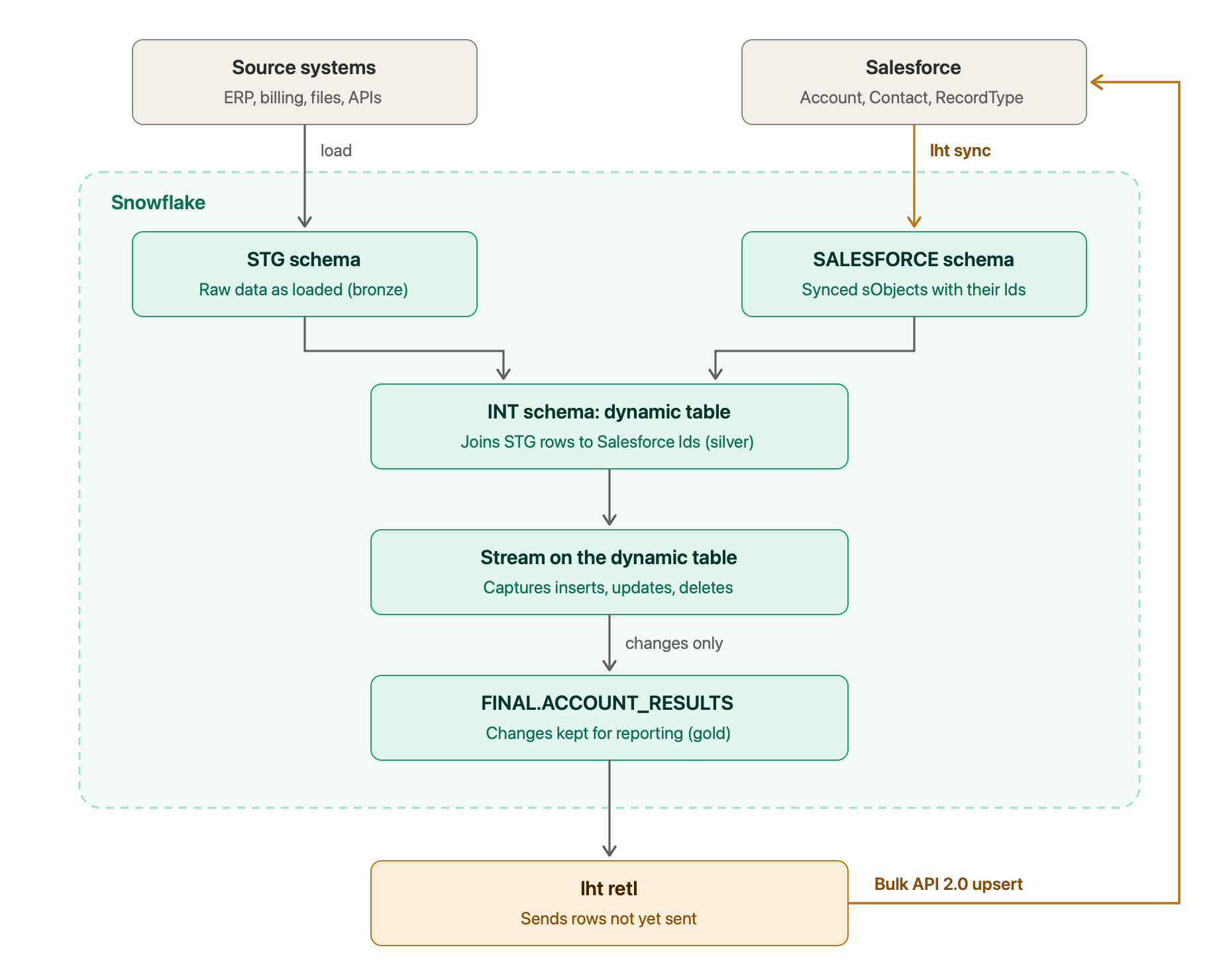
The pattern
It combines lht with two Snowflake features: dynamic tables and streams. I organize it as a medallion architecture: STG (bronze), INT (silver) and FINAL (gold).
1. Land raw data in STG (bronze). Data from your source systems (ERP, billing, files, APIs) is loaded as-is into a staging schema.
2. Sync Salesforce into its own schema. lht sync copies the Salesforce objects you need, for example Account, Contact and RecordType, into a schema I usually call SALESFORCE. After the first full load, each run brings over only the records that changed.
3. Join them in INT (silver). This is where it gets interesting. A dynamic table in the INT (intermediate) schema joins your STG data to the Salesforce data on a shared key, such as an external ID. The result is your source data with the matching Salesforce Ids attached, shaped the way Salesforce expects it. Snowflake keeps the dynamic table up to date for you.
4. Capture changes with a stream. A stream on the dynamic table records every row that is inserted, updated or deleted. Its metadata columns (METADATA$ACTION and METADATA$ISUPDATE) tell you which is which, so you can select exactly the rows that changed.
5. Record the changes in FINAL (gold). The changed rows are written to a results table in the FINAL schema, named after the sObject: FINAL.ACCOUNT_RESULTS. It’s the hand-off to Salesforce, and a permanent record of what changed and when, ready for reporting.
6. Push only the changes with lht. lht retl sends the new rows in ACCOUNT_RESULTS to Salesforce through the Bulk API 2.0, as an upsert. Deleted rows can go through lht retl delete.
Why it’s fast and cheap
In most enterprises, data doesn’t change that often. Even with millions of records, only a small percentage are new or changed on any given day. Because this pattern sends only the changes, each job is small: it finishes quickly, uses little warehouse compute, and barely touches your Salesforce API limits.
Two details that matter
Consume the stream in a transaction. A stream’s position only moves forward when you read it inside a DML statement, such as an INSERT. A plain SELECT leaves it where it was, so the same changes would be sent again on the next run. That’s why step 5 exists: the INSERT into FINAL.ACCOUNT_RESULTS consumes the stream, and lht reads from the results table. Two extra columns, CAPTURED_AT and SENT_AT, tell lht which rows are new and give you a timeline to report on.
Run these three steps in order, in one scheduled job:
-- 1. Capture the changes (this advances the stream)
INSERT INTO FINAL.ACCOUNT_RESULTS
SELECT * EXCLUDE (METADATA$ACTION, METADATA$ISUPDATE, METADATA$ROW_ID),
       CURRENT_TIMESTAMP() AS CAPTURED_AT,
       NULL AS SENT_AT
FROM INT.ACCOUNT_CHANGES          -- the stream on the dynamic table
WHERE METADATA$ACTION = 'INSERT'; -- new rows, and the new version of updated rows
# 2. Send the rows that haven't gone to Salesforce yet
lht retl upsert --sobject Account --match-field Id \
--sql "SELECT * EXCLUDE (CAPTURED_AT, SENT_AT) FROM FINAL.ACCOUNT_RESULTS WHERE SENT_AT IS NULL"-- 3. Mark them as sent (only after step 2 succeeds)
UPDATE FINAL.ACCOUNT_RESULTS SET SENT_AT = CURRENT_TIMESTAMP() WHERE SENT_AT IS NULL;Schedule the job with cron or your orchestrator of choice.
Avoid an update loop. After lht updates Salesforce, the next sync brings those records back into the SALESFORCE schema. If your dynamic table includes the fields you just pushed, the stream sees them “change” again. Keep the dynamic table focused on the source values plus the Salesforce Id, or compare against the current Salesforce values, so only real differences flow through.
What lht handles for you
lht takes care of the tedious parts: syncing Salesforce into Snowflake, creating and typing the tables, running the Bulk API jobs, and reporting results for the reverse-ETL load. You focus on one thing: getting the data you want in Salesforce into the right shape in Snowflake.
What’s next
Future posts will cover setting up lht, logging the results of reverse-ETL jobs, handling duplicate records, and more. Have a topic you’d like me to cover? Post it in lht Discussions or email me at [email protected].
Help me understand this
Question about this post, or how it would apply to your Salesforce data? Ask, and I'll reply personally.